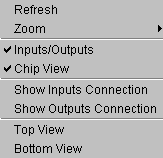
 allows you to make changes to chip viewer displays, including:
The view menu
allows you to make changes to chip viewer displays, including:
Refresh: used to refresh the display if any discontinuity appears
Zoom: contains the display zoom functions.  Full
View gives you a full view of the device; In
and Out zoom in and out.
Xilinx recommends using the toolbar for adjusting zoom
Full
View gives you a full view of the device; In
and Out zoom in and out.
Xilinx recommends using the toolbar for adjusting zoom
Inputs/Outputs: this is on on/off feature which activates a window that displays the inputs and outputs of the device. If this feature is turned on a window will appear which can be used to examine inputs and outputs. This feature is on if a check mark appears in front of the menu item
Chip View: turns the chip view on and off. If a check mark appears to the left of this item, the chip is displayed
Show Inputs Connection: displays all macrocell and pin inputs for the displayed device. To examine individual pins and macrocells, see Examining Inputs and Outputs for pins and Examining a Macrocell for macrocells
Show Outputs Connection: displays all macrocell and pin outputs for the displayed device. To examine individual pins and macrocells, see Examining Inputs and Outputs for pins and Examining a Macrocell for macrocells
Top View: displays a top view of the device
Bottom View: displays a bottom view of the device