 contains commands for loading a design into the ChipViewer, setting
up a printer, or exiting the ChipViewer.
contains commands for loading a design into the ChipViewer, setting
up a printer, or exiting the ChipViewer.There are two File menus: one contains file commands available if you have a design already loaded in the ChipViewer; the other contains commands available if you do not have a design loaded, as at Start-up.
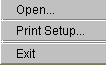
The start-up File menu
contains commands for loading a design into the ChipViewer, setting
up a printer, or exiting the ChipViewer.
Open: the Open command is used to open an .ngd or .vm6 file for use in the ChipViewer. Selecting the Open command will bring up the Open File menu. See Opening a Design
Print Setup: allows you to set up printer operations, including number of copies and paper orientation
Exit: exits the ChipViewer completely
The File menu 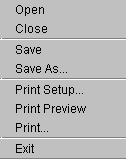 contains file and print operations, including:
Open: opens another design file
Close: closes the file on the displayed device
Save: saves the current file
Save As: allows you to save the current file under another name, or in another directory
Print Setup: allows you to set up printer operations, including number of copies and paper orientation
Print Preview: allows you to preview what will be printed by selecting Print
Print: prints the current display
Exit: exits the ChipViewer completely